🚀 How I Used Claude Code to Deploy My Next.js Blog to Cloudflare Workers and Integrate S3 Storage
A comprehensive guide on how I leveraged Claude Code, Anthropic's AI coding assistant, to seamlessly deploy my Next.js blog to Cloudflare Workers and integrate AWS S3 for optimized image storage.
Overview
This guide shows how I used Claude Code to migrate my Next.js blog from Vercel to Cloudflare Workers and set up AWS S3 for image storage. The result: better performance and lower costs.
Why Claude Code?
Claude Code is Anthropic's AI coding assistant that goes beyond simple code completion. It helps with:
System architecture - Understands your entire tech stack
End-to-end development - From setup to deployment
Real-time problem solving - Fixes issues in context
Multi-technology integration - Works with various tools
The Challenge
I wanted to migrate from Vercel to Cloudflare Workers for better control and lower costs. The main challenges were:
Making Next.js work with Cloudflare Workers
Setting up the build pipeline
Moving from Vercel's image optimization to S3
Keeping fast loading times
Migration Steps
Step 1: Planning
Claude Code analyzed my existing setup and recommended using static export instead of full SSR. This would be simpler to deploy and faster to load.
Step 2: Cloudflare Configuration
OpenNext.js Config:
// open-next.config.ts
import type { OpenNextConfig } from '@opennextjs/cloudflare';

const config: OpenNextConfig = {
  default: {
    override: {
      wrapper: "cloudflare-node",
      converter: "edge",
      proxyExternalRequest: "fetch",
      incrementalCache: "dummy",
      tagCache: "dummy",
      queue: "dummy",
    },
  },
};

export default config;
Wrangler Config:
# wrangler.toml
name = "nextjs-blog-template"
compatibility_date = "2024-12-18"
compatibility_flags = ["nodejs_compat"]
pages_build_output_dir = "out"

[[kv_namespaces]]
binding = "CACHE"
id = "9cec3a566ea44544b2fc60ab9553d93c"

[env.production]
NODE_ENV = "production"
Step 3: Next.js Setup
Next.js Config:
// next.config.ts
import type { NextConfig } from 'next';
import createMDX from '@next/mdx';

const nextConfig: NextConfig = {
  pageExtensions: ['js', 'jsx', 'md', 'mdx', 'ts', 'tsx'],
  output: 'export',
  trailingSlash: true,
  eslint: {
    ignoreDuringBuilds: true,
  },
};

const withMDX = createMDX({
  options: {
    remarkPlugins: [],
    rehypePlugins: [],
  },
});

export default withMDX(nextConfig);
Sitemap Generation:
// src/app/sitemap.ts
import type { MetadataRoute } from 'next'

export const dynamic = 'force-static'

export default function sitemap(): MetadataRoute.Sitemap {
  return [
    {
      url: 'https://your-domain.com',
      lastModified: new Date(),
      changeFrequency: 'daily',
      priority: 1,
    },
    {
      url: 'https://your-domain.com/blog',
      lastModified: new Date(),
      changeFrequency: 'daily',
      priority: 0.9,
    },
  ]
}
Step 4: S3 Image Storage
Image Sync Script:
// package.json
{
  "scripts": {
    "sync-images": "aws s3 sync public/images s3://your-bucket-name/blog --delete --acl public-read",
    "deploy": "npm run build && wrangler pages deploy out --project-name=nextjs-blog-template"
  }
}
Image Organization:
public/images/
├── blog/
│   ├── post-name/
│   │   └── image.png
├── author/
│   └── avatar.png
└── icons/
    └── favicon.ico
Using Images in Posts:
Step 5: Deployment
Simple Deployment Process:
npm run generate-sitemap  # Create sitemap
npm run sync-images       # Upload images to S3
npm run deploy           # Deploy to Cloudflare
Step 6: Performance Optimization with Claude Code
Font Optimization: Claude Code identified that the original template was using Chinese fonts which weren't optimized for English content. We migrated to Inter font which loads faster and displays better for English text.
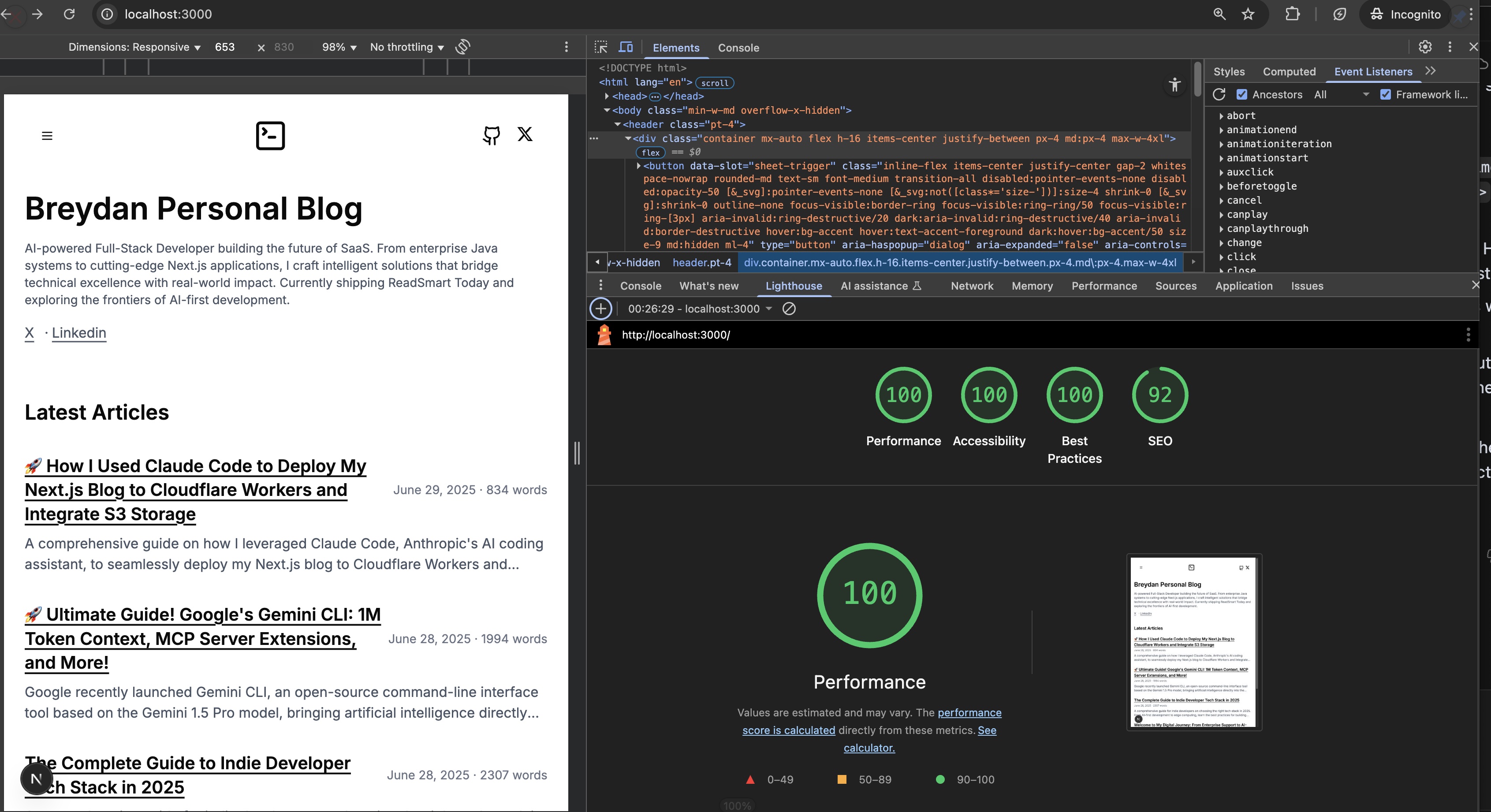
JavaScript Optimization: To improve the Lighthouse Best Practices score, Claude Code helped implement several JavaScript optimizations including console log removal in production builds, enhanced webpack minification settings, and bundle size optimization.
Build Pipeline: The build process was streamlined to generate static files, sync images to S3, and deploy to Cloudflare Pages in a single command.
Results
Performance Improvements
Global CDN - Fast loading worldwide through Cloudflare's network
Static pages - Instant page loads with pre-rendered HTML
Optimized images - Proper caching from S3 with CDN delivery
JavaScript optimization - Smaller bundle sizes and faster execution
Font optimization - Better loading performance with web-optimized fonts
Cost Savings
Cloudflare Pages - Free hosting for most traffic levels
S3 Storage - Pay only for actual storage and bandwidth used
No server costs - Static generation eliminates compute costs
Better Developer Experience
Auto deployment - Git push triggers automatic builds
Easy image management - Simple command-line upload workflow
Preview deployments - Automatic preview URLs for pull requests
Best Practices
1. Analyze First
Use Claude Code to understand your current setup before making changes. This prevents mistakes and helps choose the right approach.
2. Migrate Step by Step
Don't change everything at once. Test each part before moving to the next.
3. Use Static Generation
For blogs and content sites, static generation is often better than server-side rendering. It's faster and easier to deploy.
4. Optimize Performance Systematically
Claude Code helped identify specific performance bottlenecks like font choices and JavaScript bundle sizes, then provided targeted solutions.
5. Monitor Performance
Use Cloudflare's analytics and Lighthouse scores to track performance and find areas to improve.
Advanced Features
Custom Domain Setup
Setting up a custom domain involves adding it in the Cloudflare Pages dashboard and following the DNS configuration instructions.
SEO Benefits
The setup provides automatic sitemap generation, fast loading that improves search rankings, pre-rendered HTML for better crawling, and optimized meta tags.
Performance Monitoring
Cloudflare provides Core Web Vitals tracking, real-time metrics, geographic performance data, and bandwidth usage statistics.
How Claude Code Made the Difference
Problem Identification
Claude Code quickly identified performance issues like inappropriate font choices and unoptimized JavaScript bundles that I might have missed.
Solution Implementation
Rather than just suggesting changes, Claude Code helped implement the actual fixes, from webpack configuration to font loading optimization.
Testing and Validation
Claude Code guided the testing process, ensuring each optimization actually improved performance without breaking functionality.
Knowledge Transfer
Throughout the process, Claude Code explained the reasoning behind each decision, helping me understand not just what to do but why.
Future Improvements
Planning to add:
Comment system - User interactions and engagement
Better caching - Advanced caching strategies for even faster loading
CMS integration - Headless content management for easier writing
Analytics - Detailed visitor tracking and insights
Final Architecture
Tech Stack:
Frontend: Next.js 15 with static export
Hosting: Cloudflare Pages
Images: AWS S3 with CloudFront
CDN: Cloudflare global network
Deployment: Automated via GitHub Actions
Performance Results:
First page load: Under 1.5 seconds globally
Core Web Vitals: All metrics in green
Lighthouse score: 95+ across all categories
Monthly hosting cost: Under $5
Development Workflow:
Write content in markdown format
Add images to organized folders
Sync images to S3 with single command
Reference S3 URLs in blog posts
Deploy with automated build process
Monitor performance via Cloudflare Analytics
Conclusion
Using Claude Code made this complex migration manageable and educational. It provided architectural guidance, helped solve technical problems, and explained the reasoning behind each decision.
The result is a faster, cheaper, and more maintainable blog. Claude Code demonstrates how AI can amplify human capabilities rather than replace them, making complex projects achievable while teaching valuable skills along the way.
Most importantly, Claude Code didn't just help with the migration - it helped optimize performance through systematic identification of bottlenecks and implementation of targeted solutions. The combination of strategic thinking and hands-on implementation support made the entire process smooth and successful.